Crawl Budget Optimization: How to Stop Wasting It on Large Sites in 2026

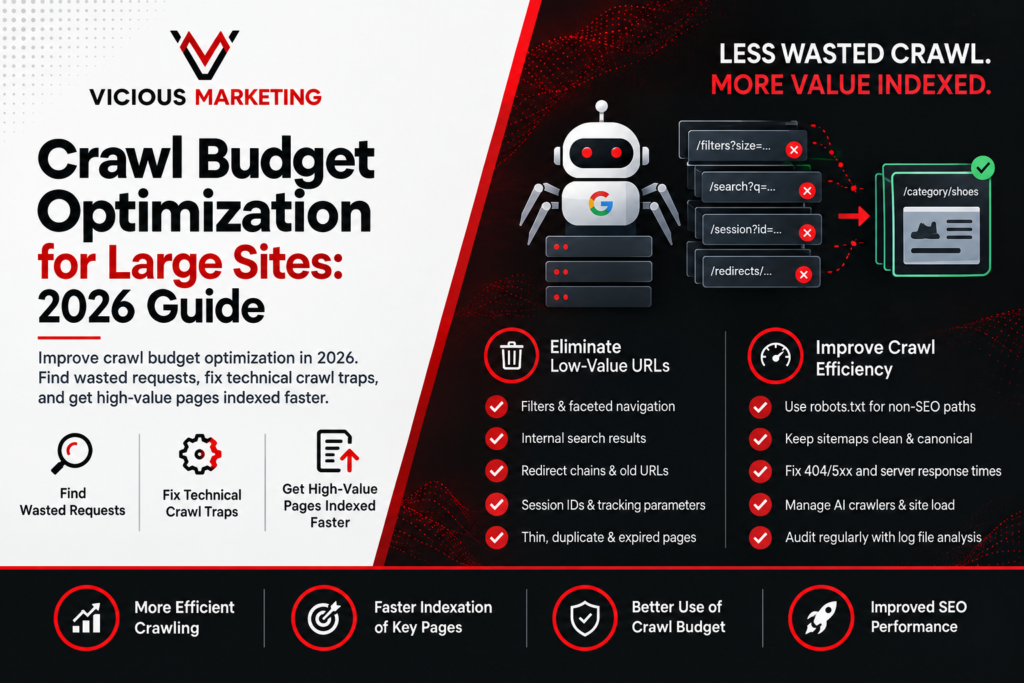
On a large website, Googlebot can look busy while achieving very little. Crawl requests climb, yet new products sit in “Discovered, currently not indexed” for days. Usually, Google hasn’t stopped crawling. It is spending too much time on filters, internal search results, redirects, session URLs, and pages nobody wants in search. Crawl budget optimization closes those leaks. The aim is not to make Google crawl everything. It is to make valuable pages easier to find and harder to miss.
What Crawl Budget Actually Means, and When It Matters
Crawl budget sounds like a fixed monthly allowance. It isn’t. Google balances crawl capacity, or what your server can handle, with crawl demand, or how interested Google is in your URLs based on popularity, quality, freshness, and change. Better hosting can improve capacity, but it will not create demand for thousands of thin pages.
Google says advanced crawl management mainly applies to sites with over 1 million pages changing weekly, at least 10,000 pages changing daily, or many discovered but unindexed URLs. So, crawl budget for large websites is a genuine concern. For a 300-page company site with clean navigation, it probably isn’t. Crawl budget is also not a direct ranking factor. Its impact comes earlier: pages that Google does not crawl and index never get the chance to rank
Diagnosing Whether Your Crawl Budget Is Actually Being Wasted
The first clue is a mismatch. Googlebot makes thousands of requests, but priority pages are still discovered slowly. Open Google Search Console > Settings > Crawl stats and look beyond the total request count. Where did those requests go, what responses did Google receive, and did performance deteriorate as crawl volume increased?
| What you see | What it may be telling you |
| Redirects make up a growing share of requests | Internal links or old URL patterns still point to moved pages |
| 404, soft 404, or 5xx responses keep appearing | Googlebot is revisiting broken or unstable sections |
| Response time rises as requests increase | Your server may be limiting crawl capacity |
| “Discovered, currently not indexed” keeps growing | Google knows about the URLs but is not prioritising them |
Search Console points you in the right direction, but its reports can hide the exact pattern causing the waste. This is where log file analysis for SEO helps. Server and CDN logs show what bots requested, the response codes, and response times. Group requests by directory, template, and parameter, then compare that activity with the pages generating traffic or revenue.
Suppose your logs show 100,000 Googlebot requests in one week. If 42,000 went to filters, 18,000 hit redirects, and only 9,000 reached current products, you do not have a crawling shortage. You have an allocation problem, and a clear priority list for developers.
Some large-site audits find 30 to 40 percent of requests landing on URLs the business would never promote. It is not a universal benchmark, but it shows why a technical SEO audit must examine what bots actually do.
What’s Actually Eating Your Budget in 2026
The biggest problems are rarely exotic. Most come from a few systems producing far more URLs than expected. Faceted navigation is the classic example. Shoppers see useful filters for size, colour, brand, and price. Googlebot may see|
/mens/shoes?colour=black&size=9&sort=price, followed by every possible variation of those filters in a different order. Multiply that across thousands of products and the site creates millions of URLs that show almost identical inventory. Internal search pages, tracking parameters, session IDs, thin archives, duplicate product paths, and expired inventory create the same problem.
In one enterprise ecommerce example, 65 percent of Googlebot activity went to internal search and faceted navigation. A publisher can face the same problem when tags, author archives, print versions, and tracking URLs expose copies of each article. Different site, same cause: too many crawlable routes to too little unique content.
Remove those routes at the source. Stop unnecessary parameters from being generated or linked. Use robots.txt for login, cart, session, and other non-SEO paths. Point internal links to final URLs, and keep sitemaps limited to canonical, indexable pages returning 200. Redirected, blocked, or non-canonical sitemap URLs send mixed signals.
Be careful with noindex and robots.txt. Blocking an indexed URL can prevent Google from seeing noindex. Let Google process the directive first, or return 404 or 410 when content is permanently gone. As Google puts it, “Any URL that is crawled affects crawl budget.” Fixing one repeatable URL pattern will do far more than cleaning up individual pages one by one.
The Bot Landscape Has Fractured. It Is Not Just Googlebot in Your Logs Anymore
Googlebot is now only part of your crawler traffic. Logs may also contain GPTBot and ClaudeBot for model development, plus retrieval crawlers such as OAI-SearchBot, Claude-SearchBot, and PerplexityBot. Cloudflare found that crawler traffic increased 18 percent between May 2024 and May 2025. GPTBot rose 305 percent, while Googlebot increased 96 percent.
These bots do not share a crawl budget, but they use the same servers, CDN, and bandwidth. A retrieval bot may support visibility in AI answers. A training crawler downloading a large resource library creates a different value exchange. Heavy AI crawling can raise costs and slow Googlebot. Decide crawler by crawler based on visibility, verifiability, server load, and how your content may be used. If AI bots are consuming a significant share of your crawl capacity, that is bandwidth Googlebot is not getting and priority pages pay the price.
How Slow Pages Quietly Shrink Your Crawl Rate
Googlebot watches how your site behaves under load. Fast, stable responses support more crawling. When latency climbs or 429 and 5xx errors appear, Google backs off. Teams often test the homepage and call the site healthy, while filters trigger expensive queries, category pages remain uncached, and JavaScript endpoints fail during busy periods. Review response times by template and bot rather than relying on one sitewide average. Improve caching, database performance, CDN configuration, and error handling. Core Web Vitals measure user experience, not crawl capacity, but both expose similar performance problems. Vicious Marketing’s Core Web Vitals service can help find them.
Building a Recurring Crawl Budget Audit
Crawl budget optimization is not a one-time cleanup. Filters appear, products expire, and redirects pile up. Review millions of pages or daily inventory changes monthly. For 10,000 to 1 million URLs with slower publishing, quarterly is usually enough. Recheck after migrations, CMS releases, or indexation shifts.
Screaming Frog Log File Analyser suits focused investigations. Botify, OnCrawl, and JetOctopus handle larger datasets and recurring monitoring. This enterprise SEO platform comparison covers the wider toolset. Whatever you use, find the pattern consuming requests, fix it through routing, links, canonicals, robots.txt, status codes, or sitemaps, then recheck the logs. The real win is Googlebot spending more time on new, updated, and commercially important pages.
Frequently Asked Questions
What is crawl budget and why does it matter for SEO?
Crawl budget describes how much Google can and wants to crawl. It matters when low-value URLs delay important pages. It affects index access, not rankings directly.
Does crawl budget optimization matter for small websites?
Usually not. For a few hundred or thousand well-linked pages, focus on content, internal linking, indexability, and sitemaps. Advanced optimization matters when scale creates discovery problems.
How do I know if Google is wasting crawl budget on my site?
Compare Search Console with server logs. Look for heavy crawling of filters, redirects, errors, duplicates, and internal search while priority pages receive few visits.
What’s the fastest way to fix a crawl budget problem?
Find the wasteful URL pattern and fix it at the source. Start with filters, internal search, session parameters, redirect chains, and polluted sitemaps.
How often should I audit crawl budget on a large site?
Review monthly for millions of pages or fast-changing inventory. Quarterly suits many smaller large sites. Recheck after migrations, releases, or indexing changes.
Not sure how much crawl budget your site is actually wasting? Get a technical SEO audit from Vicious Marketing →